Watermark Video: Sign Your Astrophotography with Style
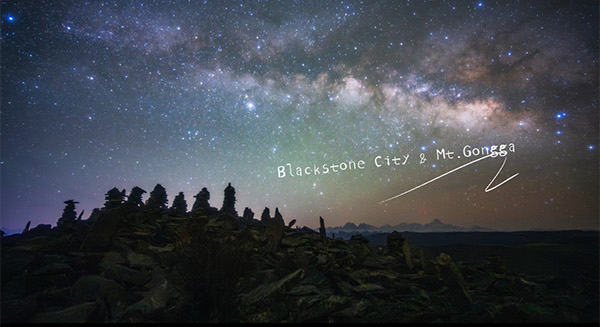
Introduction
You spent the night under the stars, framed the Milky Way, ran the image through RawFlow, and pulled out every last photon of detail. Now you have a finished photo you are proud of — but when you share it online, it gets reposted without credit, stripped of context, or simply lost in the feed.
To solve that, RawFlow is launching Watermark Video — a brand-new feature that turns your edited astrophotography into a polished 10-second share-ready video, stamped with your own animated signature.
With Watermark Video, the story behind your photo travels with the photo itself. A short, cinematic clip — your image, your name, your style — ready to post anywhere in seconds.
What is Watermark Video?
Watermark Video is a small but powerful companion to your RawFlow workflow. Once you have finished editing a RAW file, you can generate a 10-second looping video that combines:
- Your edited star photo as the base frame
- A personalized text signature (your name, handle, location, or quote)
- Optional animated effects on the watermark
- Custom typography, colors, shadows, and rotation
- A background plate that frames the text
The output is a lightweight MP4 that looks great on Instagram Reels, TikTok, X, WeChat Moments, and anywhere else you share your work.
Why We Built It
We talked to hundreds of astrophotographers in the RawFlow community. The same three frustrations kept coming up:
- Credit gets lost. Beautiful photos are reposted without attribution.
- Static images are forgettable. A still photo rarely stops the scroll.
- Watermarks look ugly. Big opaque logos ruin the photo you worked so hard on.
Watermark Video addresses all three. By turning your watermark into a short, animated signature clip, you protect your work, get more eyes on your photo, and look like a pro while doing it.
Key Features
1. Personalized Text Signature
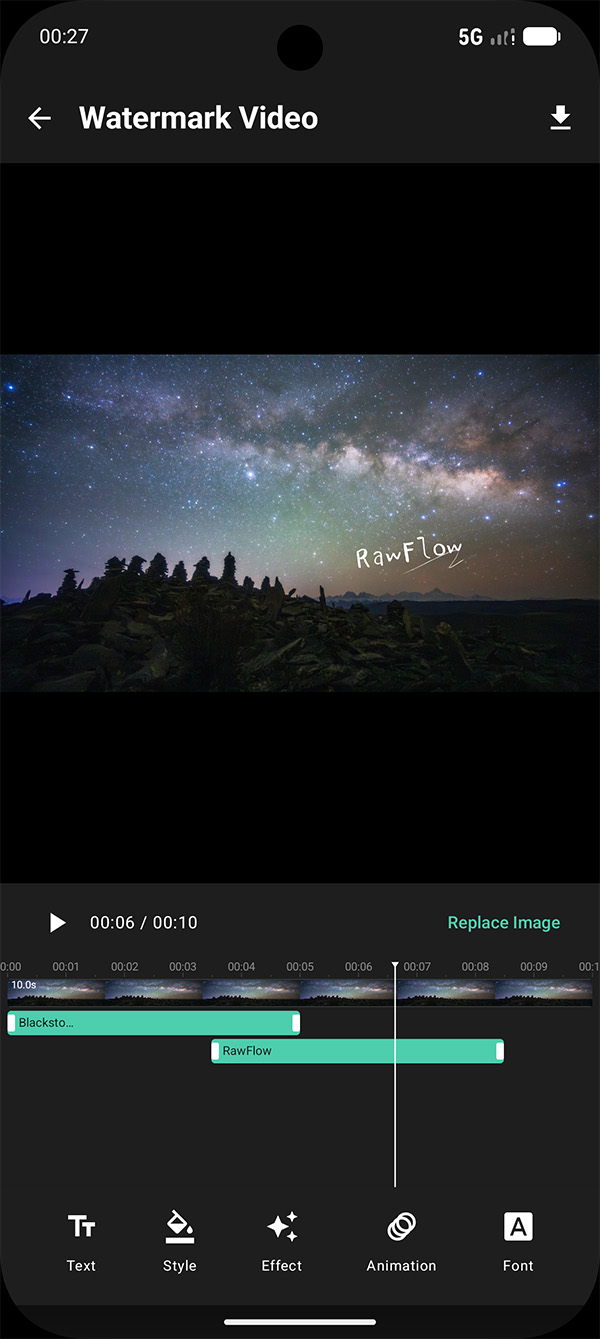
Add any text as your watermark — your name, your Instagram handle, the camera and lens you used, or a poetic line about the night you shot the photo.
 {: style="max-width:450px;width:100%;height:auto;"}
- Multiple lines supported
- Editable font, size, color, and weight
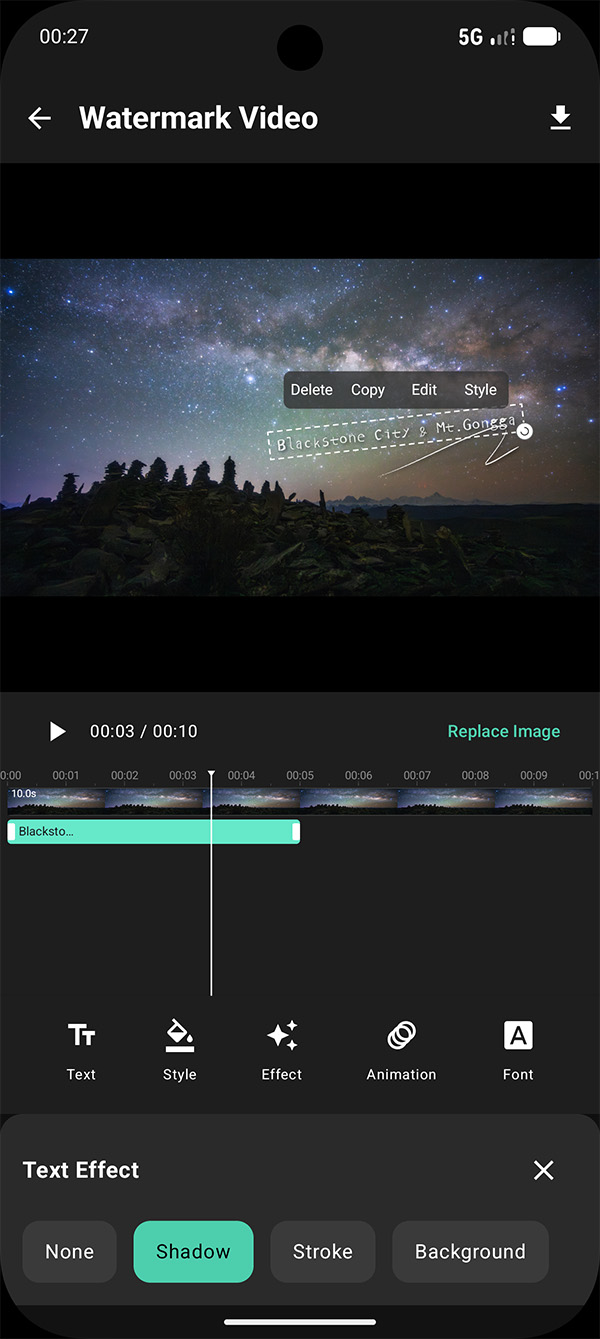
- Background plate with adjustable opacity and color
- Drop shadow for legibility against bright nebulae
2. Dynamic Animation Effects
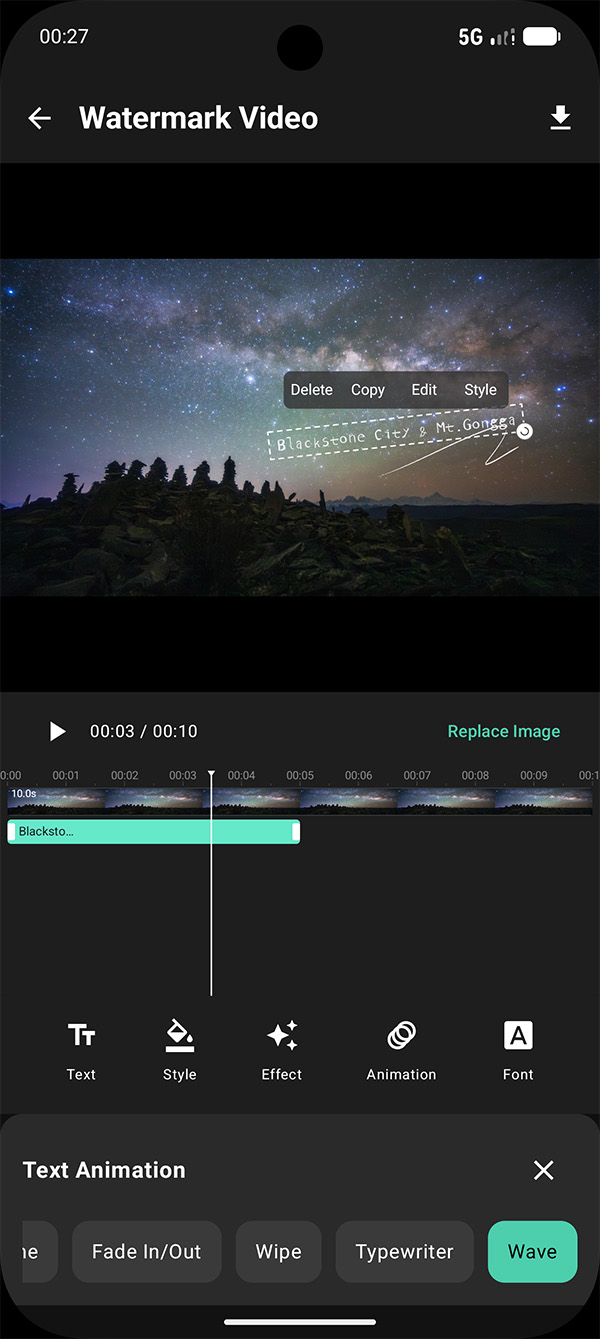
A static watermark is boring. RawFlow ships with a curated set of animation presets that bring your signature to life:
 {: style="max-width:450px;width:100%;height:auto;"}
- Fade In / Fade Out — the signature gently appears and disappears
- Slide — text slides in from the edge of the frame
- Typewriter — characters appear one by one, perfect for a poetic line
- Pulse — subtle scale rhythm that draws the eye without distraction
You can stack multiple effects, adjust their duration, and preview the result in real time.
3. Text Styling and Color
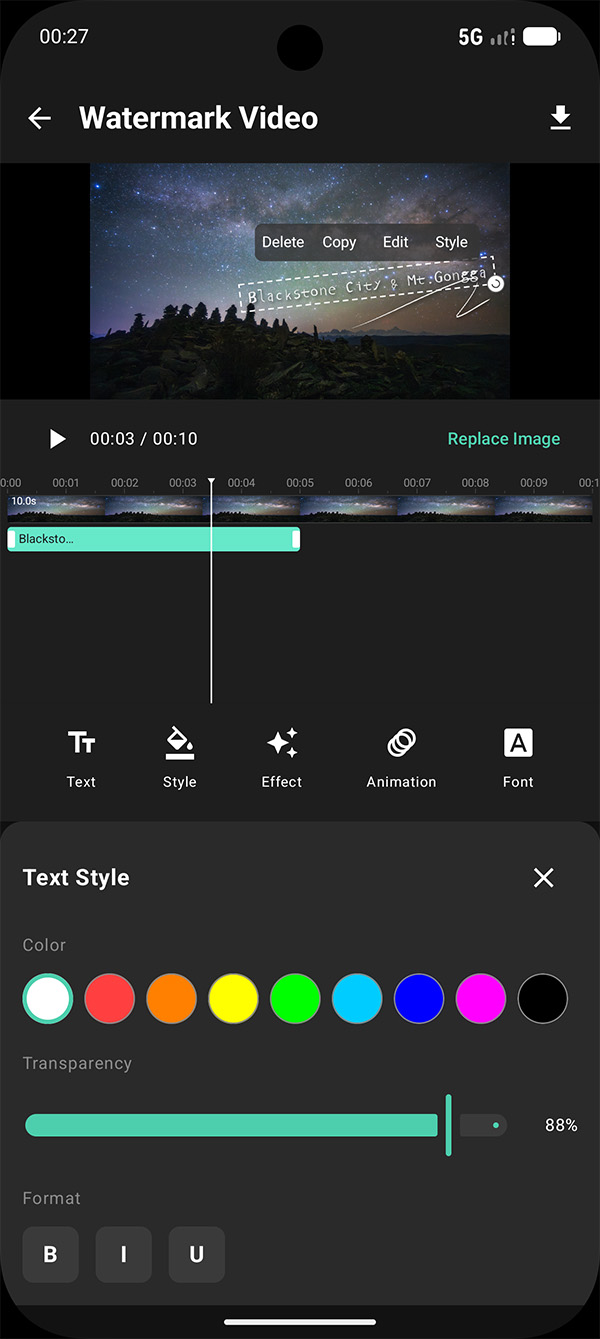
Color and typography matter, especially when your photo already has a strong palette (think deep hydrogen-alpha reds or icy blue reflection nebulae).
 {: style="max-width:450px;width:100%;height:auto;"}
- Full color picker for the text and the background plate
- Drop shadow with adjustable angle, blur, and opacity
- Outline / stroke for crisp visibility on busy backgrounds
- Letter spacing and line height for fine typographic control
4. Custom Fonts
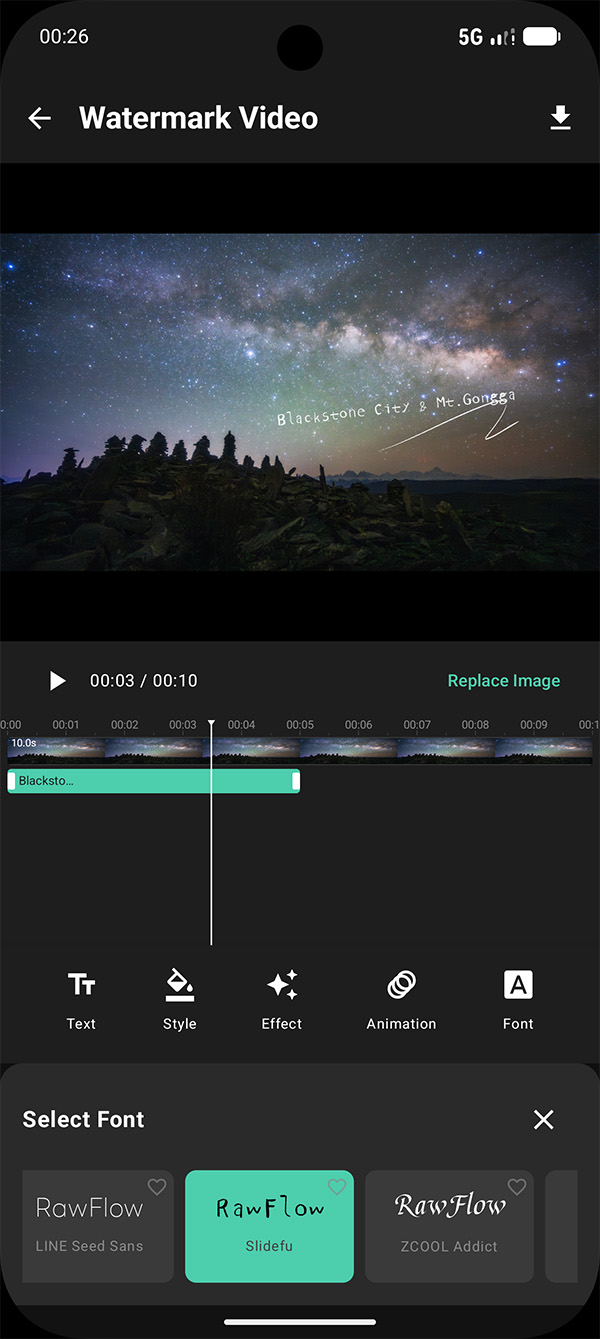
Your signature should feel like you. Pick from a curated library of fonts — modern sans, elegant serif, monospace, handwriting, and more.
 {: style="max-width:450px;width:100%;height:auto;"}
- Built-in font library tuned for screen legibility
- Bold, italic, and condensed variants
- Live preview as you switch fonts
5. Effects, Angle, and Opacity
Sometimes you want a watermark that whispers, not shouts. RawFlow gives you full control over the final look:
 {: style="max-width:450px;width:100%;height:auto;"}
- Rotation slider — tilt your watermark at any angle for a cinematic feel
- Opacity slider — from bold to barely-there
- Scale slider — small signature in the corner, or a centered title card
- Position presets — corners, edges, or free drag
How to Use Watermark Video
Step 1: Finish Your Edit in RawFlow
Open your RAW file and complete your normal editing workflow — white balance, dehaze, denoise, color grading, star reduction, the works. Watermark Video works on the final image.
Step 2: Open Watermark Video
Tap the Share button on the export screen and select Watermark Video. Your current edit will be loaded as the base frame.
Step 3: Add Your Signature
Type in your watermark text. Try:
@your.handlefor social attributionShot on Sony A7S III · Sigma 14mm f/1.4for gear enthusiastsA clear night in Atacama, 2026for storytelling- A short poem or quote that matches the mood of the photo
Step 4: Pick an Animation
Choose one of the dynamic effects — typewriter for a quote, fade for a clean look, slide for a punchy share clip. Adjust the speed until it feels right.
Step 5: Style It
Pick a font, set the color, add a shadow, tilt the angle, and dial the opacity. Use the live preview to see exactly how the 10-second clip will play.
Step 6: Export and Share
Export as MP4 and share directly to your favorite platform. The whole process takes less than a minute once you have your style locked in.
Creative Ideas to Try
- The Minimalist — small white signature, typewriter effect, 30% opacity, tucked in the corner
- The Title Card — large centered text, fade in, dark shadow, ideal for a hero clip
- The Trail Log — gear list + date + location, slide in from the bottom
- The Poem — a short verse appears character by character, then fades to your signature
Tips for a Watermark That Actually Works
- Keep it small in the corner unless the watermark is the point of the video
- Use high contrast — light text on dark sky, dark text on bright Milky Way core
- Limit animations to one or two effects; too many movements feel spammy
- Match the mood — a calm Milky Way panorama deserves a calm fade, not a flashy slide
- Always include a way to find you — a handle is more useful than a real name
Built for Sharing
Watermark Video outputs are optimized for the platforms where astrophotographers actually live:
- 10-second duration — perfect for Reels, TikTok, Shorts, and Moments
- Vertical and square safe areas — text stays visible after platform cropping
- Lightweight MP4 — uploads fast even on mobile data
- Watermark stays legible in feeds, on dark mode, and at small sizes
What's Next
Watermark Video is just the first step. On the roadmap:
- Music and ambient soundscapes baked into the video
- Multi-image slideshows for before / after edits
- Branded intros and outros
- Direct share integrations with the platforms you use most
Conclusion
A great astrophotography image deserves a great way to be seen. With Watermark Video, RawFlow gives you a fast, beautiful way to put your name on your work — and turn a still photo into a moment worth sharing.
Open RawFlow, finish your next edit, tap Watermark Video, and put your signature on the night sky.
Have a creative use for Watermark Video? Share it with the community — we are always looking for the next great idea to build on.